


Find Your Best Learning Platform
Fill out the form to see which platform matches your needs in 2026.
Platform Name
Type
Cost
Description goes here.
Why this fits: Reasoning
Scrolling through endless lists of online course providers can feel like trying to find a needle in a haystack. You want to learn something new-maybe pick up Python, get certified in project management, or finally master digital marketing-but the sheer number of options is paralyzing. Is it worth paying for that premium subscription? Will the certificate actually help your career? Or should you just stick with free YouTube tutorials?
The truth is, there is no single "best" platform for everyone. The right choice depends entirely on what you are trying to achieve. Are you looking for academic credit, a quick practical skill, or deep theoretical knowledge? In 2026, the landscape has shifted again. AI-driven personalization and micro-credentials have changed how we consume education. This guide cuts through the noise to help you match your specific goals with the platform that delivers real value.
Defining Your Learning Goal First
Before you spend a dime or even an hour, you need to be honest about why you are clicking on these ads. Most people fail at online learning not because the content is bad, but because they picked the wrong tool for the job. Think of it like buying shoes. You wouldn’t wear running spikes to a formal wedding, and you shouldn’t use a casual hobby site to prepare for a rigorous engineering exam.
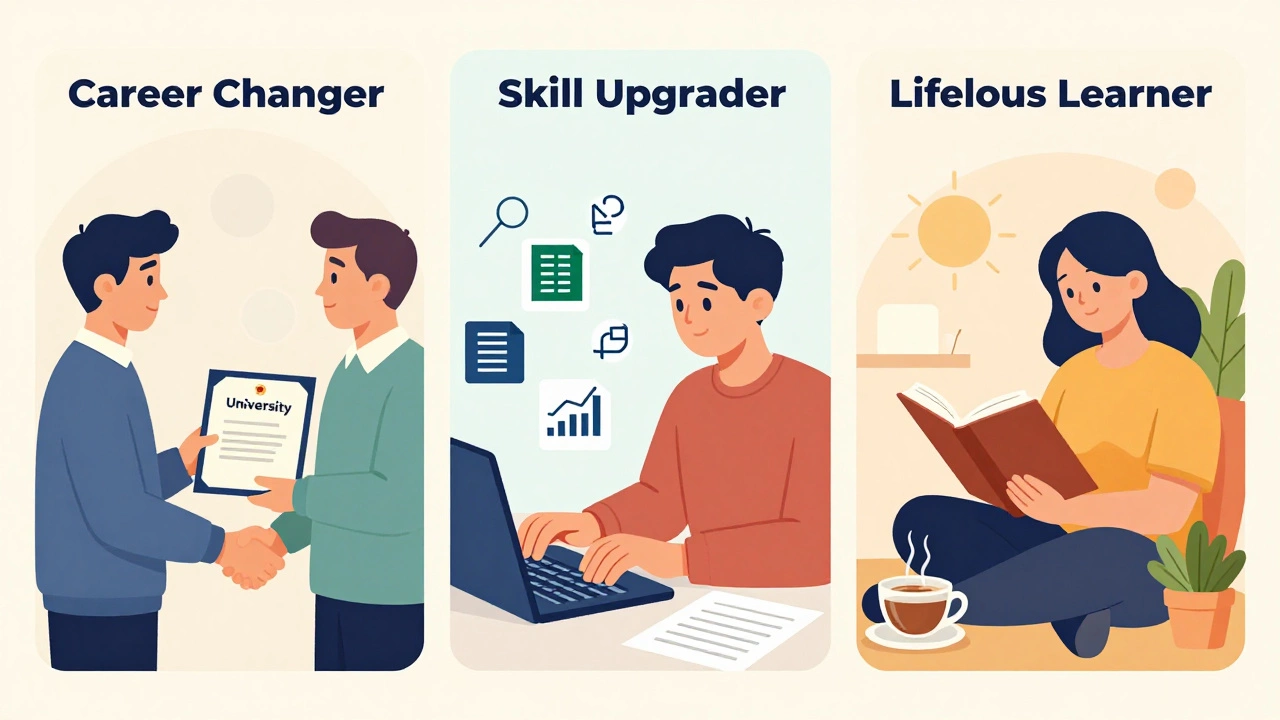
Generally, learners fall into three buckets:
- Career Changers: You need recognized credentials, structured paths, and often human mentorship to pivot industries.
- Skill Upgraders: You already have a job but need a specific technical skill (like Excel macros or SEO basics) quickly.
- Lifelong Learners: You are curious about history, philosophy, or cooking, and you don’t necessarily need a piece of paper to prove you learned it.
Your goal dictates the platform. If you are in the first bucket, free resources will likely frustrate you. If you are in the third, expensive university degrees are overkill. Let’s break down the major players based on these needs.
University-Backed Rigor: Coursera and edX
If credibility is your main concern, Coursera is an online learning service that offers open online courses, MOOCs, certificates, and degree programs, partnering with top universities like Yale and Stanford, as well as companies like Google and IBM. It is the gold standard for those who want their LinkedIn profile to pop. When you finish a specialization here, you aren’t just watching videos; you are often completing peer-reviewed assignments and building a portfolio.
Similarly, edX is a non-profit massive open online course provider co-founded by Harvard University and MIT. It leans slightly more towards the academic side. If you are interested in computer science from Berkeley or data science from Microsoft, edX is where you go. Both platforms offer financial aid, which is a huge plus if you are on a budget but still need that university stamp of approval. However, be warned: the pace can be slow, and the bureaucracy of grading can sometimes feel clunky compared to newer tech-first platforms.
Practical Skills and Speed: Udemy and Pluralsight
Now, let’s talk about speed. If you need to learn how to use Adobe Photoshop today so you can edit photos for a client tomorrow, university courses are too slow. This is where Udemy is an online learning marketplace offering over 210,000 courses taught by independent instructors. Udemy is a marketplace, meaning anyone can teach. This leads to variable quality. Some courses are gems; others are outdated messes. You have to read reviews carefully. Look for courses with high ratings and recent updates. The beauty of Udemy is the price. Courses are rarely more than $20 during sales, making it low-risk experimentation.
For developers specifically, Pluralsight is a technology-focused online learning platform providing courses on software development, IT operations, and creative skills. Unlike Udemy, Pluralsight curates its content strictly. It is less about "how to do X once" and more about mastering a technology stack over time. Their skill assessments are excellent for identifying gaps in your coding knowledge. If you are a professional developer, this is often worth the subscription cost because the content stays current with the latest frameworks and libraries.
Creative and Soft Skills: Skillshare and MasterClass
What if you want to write better copy, design better logos, or improve your public speaking? Technical platforms often miss the mark here. Skillshare is an online learning community focused on creative and entrepreneurial skills such as illustration, photography, and marketing. The format is different. Classes are shorter, project-based, and feel more like workshops than lectures. You upload your work, and other members give feedback. It builds a community around creativity. It is fantastic for freelancers and creatives who need inspiration and practical tips rather than academic theory.
On the opposite end of the spectrum is MasterClass is an online education platform offering classes taught by notable figures in various fields. You are learning cooking from Gordon Ramsay or writing from Shonda Rhimes. Be realistic: you won’t become a Michelin-star chef after one month. But you will gain insights into their mindset and workflow. It is entertainment with educational value. Use it for inspiration and high-level strategy, not for step-by-step technical execution.
Corporate and Professional Development: LinkedIn Learning
If your company pays for your education, LinkedIn Learning is an online learning service that provides video courses taught by industry experts on business, creative, and technology skills. is likely your best bet. The integration with your LinkedIn profile is seamless. When you complete a course, it automatically adds the certificate to your profile, signaling to recruiters that you are proactive. The content is polished, concise, and highly relevant to corporate environments. Topics range from leadership and management to Excel and SQL. It is not the deepest dive into any subject, but it is the most efficient way to get business-ready skills quickly.
Comparison of Top Platforms
| Platform | Best For | Cost Model | Credential Value | Content Quality Control |
|---|---|---|---|---|
| Coursera | Career changers, academics | Subscription/Audit | High (University-backed) | Strict (Partner vetting) |
| Udemy | Specific technical skills | Per-course purchase | Low (Completion cert only) | Variable (Marketplace) |
| Pluralsight | Developers, IT pros | Subscription | Medium (Industry recognized) | High (Curated) |
| Skillshare | Creatives, entrepreneurs | Subscription | Low (Portfolio focus) | Moderate (Community driven) |
| LinkedIn Learning | Business professionals | Subscription/Org paid | Medium (Profile visibility) | High (Professional production) |

Hidden Costs and Time Commitments
We often forget that time is money. A cheap Udemy course might cost $15, but if it takes you 40 hours to finish because the instructor is disorganized, that is $0.37 per minute of your life. Conversely, a Coursera specialization might cost $49 a month, but if it gets you hired within two months, the ROI is massive. Always check the estimated time commitment listed on the course page. Multiply that by your hourly wage. Does the potential salary increase or career satisfaction justify that investment?
Also, consider the "hidden" cost of engagement. Platforms like Skillshare thrive on community interaction. If you are shy or dislike peer review, you might struggle to get value out of it. Coursera requires discipline to keep up with weekly deadlines. Choose a platform whose culture matches your personality.
How to Choose: A Decision Checklist
Still stuck? Run your situation through this quick checklist:
- Do you need a verified certificate for HR purposes? Yes → Coursera, edX, or LinkedIn Learning. No → Udemy, Skillshare.
- Is your goal technical (coding, data) or soft skills (management, communication)? Technical → Pluralsight, Coursera. Soft Skills → LinkedIn Learning, MasterClass.
- Are you on a tight budget? Yes → Audit free courses on Coursera/edX or buy sale courses on Udemy. No → Consider subscriptions for broader access.
- Do you prefer self-paced or structured schedules? Structured → Coursera/edX (weekly deadlines). Self-paced → Udemy, Skillshare.
The Future of Online Learning in 2026
One thing is clear: the days of passive video-watching are fading. AI tutors are now integrated into many platforms, offering instant feedback on code or essays. Micro-credentials are replacing traditional degrees in some industries. Employers care less about where you learned and more about what you can build. Regardless of the platform, the winners are those who apply what they learn. Build a project. Write an article. Automate a task. The platform is just the vehicle; your action is the engine.
Which platform is best for beginners in coding?
For absolute beginners, Coursera offers excellent introductory courses from universities that explain concepts clearly. However, Udemy has many affordable, hands-on courses like "The Web Developer Bootcamp" that are great for getting started quickly without academic jargon. If you prefer a gamified approach, Codecademy (not detailed above but worth noting) is also strong for syntax practice.
Are certificates from Udemy respected by employers?
Generally, no. Because anyone can create a course on Udemy, the certificate proves completion, not competence. Employers respect the skill you demonstrate in a portfolio or interview, but they rarely view a Udemy certificate as a credential. For recognized credentials, stick to Coursera, edX, or LinkedIn Learning.
Can I get a full university degree online?
Yes, both Coursera and edX partner with universities to offer full Bachelor’s and Master’s degrees online. These are accredited and identical to on-campus degrees in terms of rigor. They are significantly more expensive than individual courses, often costing thousands of dollars, but they provide the same diploma.
Is it worth paying for a subscription vs buying individual courses?
If you plan to take more than two courses in a month, a subscription (like LinkedIn Learning or Coursera Plus) is usually cheaper. Subscriptions also encourage exploration. If you only need one specific skill right now, buying a single course on Udemy is more cost-effective since you own it forever, whereas subscriptions stop giving access when you cancel.
Which platform has the best mobile app experience?
Skillshare and LinkedIn Learning have very user-friendly mobile apps designed for short, on-the-go lessons. Coursera’s app is functional but can feel cluttered due to the complexity of university-grade assignments. If you learn primarily on your phone, prioritize platforms with bite-sized content.